

K6 Cloud
 Load Test
K6 Cloud
Runs a K6 load test in the K6 cloudLoad TestK6 Cloud
Load TestK6 Cloud
Runs a K6 load test in the K6 cloudLoad Test Go back to list
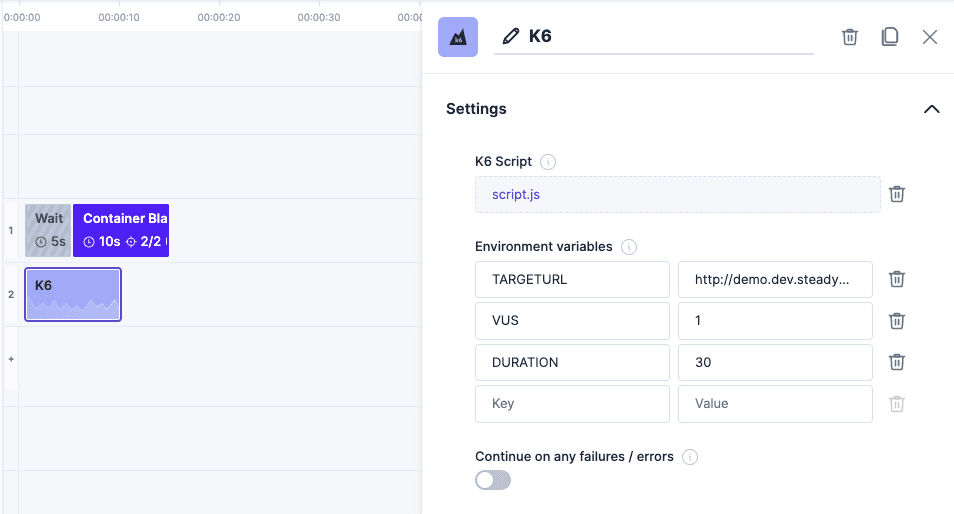 K6 loadtest within the experiment editor.
Introduction
K6 is a developer-centric, free and open-source load testing tool built for making performance testing a productive and enjoyable experience. You can integrate the execution of K6 load tests directly into your experiments.
Parameters
| Parameter | Description | Default |
|---|---|---|
| K6 Script or Archive | Your k6 test, as a single script (.js) or as a k6 archive (.tar). | |
| Duration | (optional) How long the load test runs, in seconds, minutes or hours. Leave empty to use the script's options. | |
| Virtual users | (optional) How many virtual users k6 starts, at least 1. Leave empty to use the script's options. | |
| Environment variables | (optional) Environment variables passed to k6, available in the script via __ENV. |
Details
To use K6, add a step of type "K6 Cloud" and upload your test with the provided file upload. Two formats are supported:
-
A single script (
.js). -
A k6 archive (
.tar), for tests that import other local files or read data files withopen(). Create it withk6 archive; it contains the script, every local file it references, and the script's options:k6 archive tests/main.js -O archive.tar
By default, uploads are limited to 5 MB per file. Data files opened with open() are part of the archive and count towards that limit.
Duration and Virtual Users
Set Duration and Virtual users on the step to run the same test with a different load, without changing or re-archiving it. They override the script's own options and work the same for scripts and archives:
- Duration replaces the script's
duration,stagesanditerations. The experiment editor also uses it to show how long the step runs, so you can plan the steps around it. Without a duration, the editor shows the step at a default length, and how long it actually runs depends on the script. - Virtual users replaces the script's
vus.
Leave both empty to run the script exactly as written.
Both parameters can't be combined with k6 scenarios. A duration would replace all of the script's scenarios with a single default one, and the virtual users alone would be ignored. If the script defines scenarios and either parameter is set, the step fails right at the start of the experiment run, before any load is generated, with: The VUs and Duration parameters can't be combined with k6 scenarios. Clear the parameters or remove the scenarios. To control the load of such a script, change its scenarios instead.
Environment Variables
The step's environment variables are passed to k6. Use them in the script's code via __ENV, e.g. __ENV.TARGETURL.
Don't use them inside options. When you create an archive, k6 evaluates the options and stores the result in the archive, so a value like duration: `${__ENV.DURATION}s` keeps the value it had while archiving. Use the step's Duration and Virtual users parameters instead. Steps that already set K6_DURATION or K6_VUS as environment variables keep working; if the parameters are set too, the parameters take precedence.
Environment variables passed to k6 archive with -e are stored in the archive in plain text. Set secrets as environment variables on the step instead.
If you don't know where to start, feel free to use our example. It is a very basic script and will just perform some HTTP calls on a specified endpoint.
Example K6 Load Test Script
import http from 'k6/http';
import { check, sleep } from 'k6';

// Defaults when the step's Duration and Virtual users are left empty.
export const options = {
  vus: 10,
  duration: '30s',
};

export default function () {
  const response = http.get(__ENV.TARGETURL);
  check(response, { 'status was 200': (r) => r.status === 200 });
  sleep(1);
}
Example Step Configuration
| Parameter | Example | Effect |
|---|---|---|
| Duration | 60 seconds | The load test runs for 60s instead of the script's 30s. |
| Virtual users | 20 | k6 starts 20 virtual users instead of the script's 10. |
| Environment variables | TARGETURL = https://www.steadybit.com | The script reads the URL to call via __ENV.TARGETURL. |


 Statistics
 -Stars
 Tags
Tags
 GitHubghcr.io
 License


