Steadybit logoReliability Hub
GitHubGitHub iconStart Free Trial
Steadybit logoReliability Hub

Check Queue Backlog

CheckCheck
Monitor the total message count (backlog) in a RabbitMQ queue and fail the experiment if it exceeds a threshold
Targets:
RabbitMQ Queues
Install now

Check Queue Backlog

Monitor the total message count (backlog) in a RabbitMQ queue and fail the experiment if it exceeds a threshold
CheckCheck
Install now

Check Queue Backlog

CheckCheck
Monitor the total message count (backlog) in a RabbitMQ queue and fail the experiment if it exceeds a threshold
Install now

Check Queue Backlog

Monitor the total message count (backlog) in a RabbitMQ queue and fail the experiment if it exceeds a threshold
CheckCheck
Install now
Go back to list
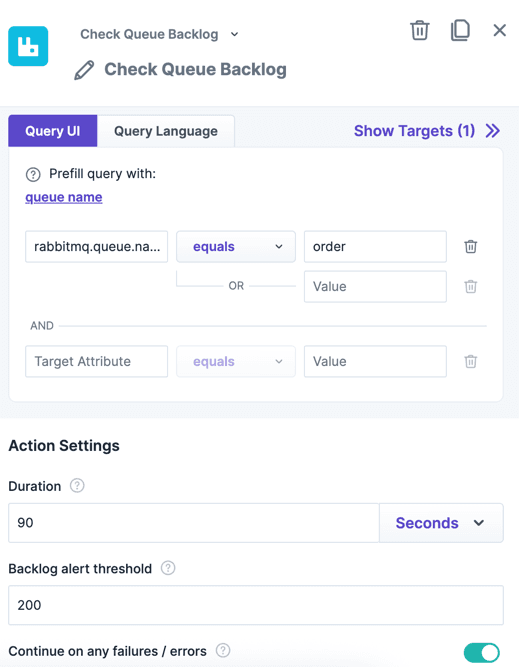
The action "Check Queue Backlog" within the experiment editor.The action "Check Queue Backlog" within the experiment editor.

Introduction

Monitors the total message count (backlog) in a RabbitMQ queue during an experiment. If the backlog exceeds the configured threshold at any point during the check, the experiment fails.

This action targets queues, not nodes. For node-level monitoring (node down, alarms), use Check Node instead.

Use Cases

  • Fail the experiment if the queue backlog grows beyond an acceptable threshold during a consumer fault injection.
  • Verify that consumers keep up with message production while injecting network latency on consumer pods.
  • Combine with Publish (Messages / s) to generate load and verify the backlog stays within bounds.

Parameters

ParameterDescriptionDefault
DurationHow long the check runs. The queue backlog is polled continuously for this duration.30s
Acceptable BacklogThe maximum acceptable number of messages in the queue. If the total message count exceeds this value at any point during the check, the experiment fails. Specified as an integer (number of messages).10

More RabbitMQ Queue Actions

See all
Alter Queue Max Length
Limit the maximum number of messages a queue can hold by creating a temporary RabbitMQ policy. The policy is removed when the attack ends.
AttackAttack
RabbitMQ Queues
Start Using Steadybit Today

Get started with Steadybit, and you’ll get access to all of our features to discover the full power of Steadybit. Available for SaaS and on-prem!

Are you unsure where to begin?

No worries, our reliability experts are here to help: book a demo with them!

Statistics
-Stars
Tags
Message Queue
RabbitMQ
Homepage
hub.steadybit.com/extension/com.steadybit.extension_rabbitmq
License
MIT
MaintainerSteadybit
Install now
Steadybit logoReliability Hub
Start Free Trial
© 2026 Steadybit GmbH. All rights reserved.
Twitter iconLinkedIn iconGitHub icon