Steadybit logoReliability Hub
GitHubGitHub iconStart Free Trial
Steadybit logoReliability Hub

Trigger Delete Records

AttackAttack
Delete records from topic partitions by moving the offset forward, simulating message loss for consumers
Targets:
Kafka Topics
Install now

Trigger Delete Records

Delete records from topic partitions by moving the offset forward, simulating message loss for consumers
AttackAttack
Install now

Trigger Delete Records

AttackAttack
Delete records from topic partitions by moving the offset forward, simulating message loss for consumers
Install now

Trigger Delete Records

Delete records from topic partitions by moving the offset forward, simulating message loss for consumers
AttackAttack
Install now
Go back to list
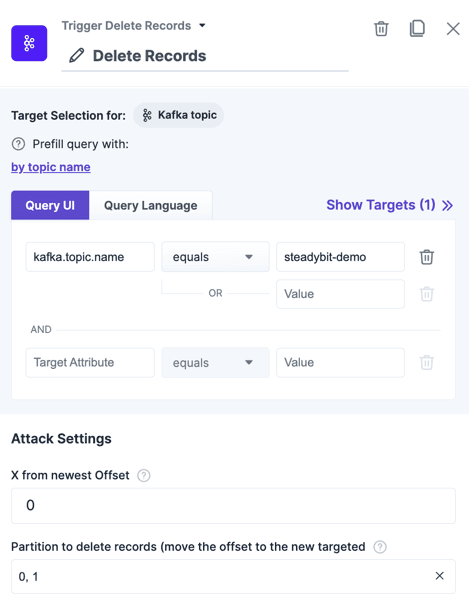
The action "Trigger Delete Records" within the experiment editor.The action "Trigger Delete Records" within the experiment editor.

Introduction

Deletes records from a Kafka topic by advancing the partition offset, making older records inaccessible to consumers. The offset is moved relative to the latest known offset — for example, specifying 0 moves to the latest offset (skipping all unconsumed records), while specifying 10 keeps the last 10 records.

Warning: "Last records" refers to the topic's records, not the consumer's committed offset. Records deleted this way are permanently inaccessible.

Recommendation: Block consumers before deleting records (using Deny Access or a network block action) to control the timing. This lets you observe how the consumer reacts to a gap in records when access is restored.

Use Cases

  • Simulate message loss by deleting records while a consumer is blocked, then observe how the consumer handles the offset gap.
  • Test consumer recovery logic when records it expected to process no longer exist.
  • Verify that downstream systems handle missing messages gracefully.

Parameters

ParameterDescriptionDefault
X from newest OffsetHow many records to keep relative to the newest offset. 0 means advance to the latest offset, skipping all records. 10 means keep the 10 most recent records and delete everything before them. This is applied per partition.
Partition to issue delete records requestsOne or more partition IDs to delete records from. Specified as a list of partition numbers (e.g., 0, 1, 2). Only the selected partitions are affected.

Useful Templates

See all
Check Kafka consumer's reaction to record loss

Intent

Intentionally deny access to the topic for consumers and during this time where consumption is stopped, delete records.

We can check the logs of the consumers to see how they handle the loss of records and also authorization access issues.

Message Queue
Kafka
Recoverability

More Kafka Topic Actions

See all
Start Using Steadybit Today

Get started with Steadybit, and you’ll get access to all of our features to discover the full power of Steadybit. Available for SaaS and on-prem!

Are you unsure where to begin?

No worries, our reliability experts are here to help: book a demo with them!

Statistics
-Stars
Tags
Message Queue
Kafka
AWS
Homepage
hub.steadybit.com/extension/com.steadybit.extension_kafka
License
MIT
MaintainerSteadybit
Install now
Steadybit logoReliability Hub
Start Free Trial
© 2026 Steadybit GmbH. All rights reserved.
Twitter iconLinkedIn iconGitHub icon